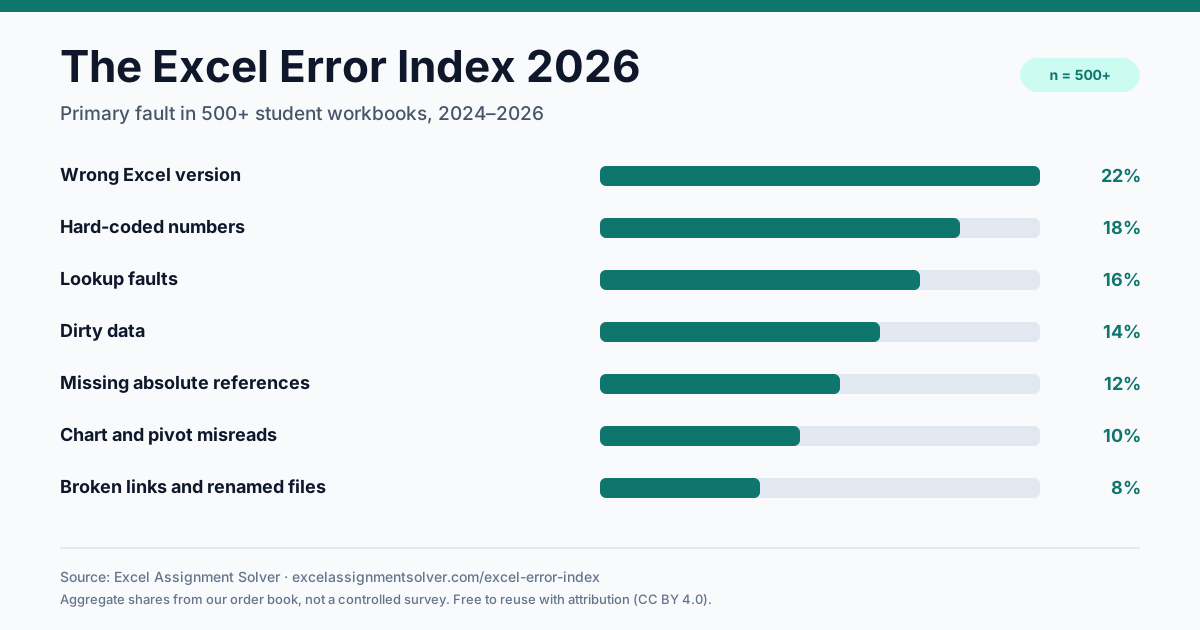
Each card gives the definition, the symptom, the first fix and the tool or guide that handles it.
#1
Wrong Excel version
22%The workbook uses XLOOKUP, VSTACK, FILTER, TEXTSPLIT or another function that does not exist in the submission machine's Excel version.
Symptom: A modern function works on one machine and fails on another.
First fix: Check File → Account → About Excel. Rebuild with functions available in that version, or add a Power Query / INDEX-MATCH fallback.
#2
Hard-coded numbers
18%Rates, thresholds, years or totals are embedded in formulas, so the model cannot be audited, updated or defended when an input changes.
Symptom: Numbers are typed inside formulas instead of living in input cells.
First fix: Move every assumption to a labelled input cell, then reference it with an absolute address such as $B$4.
#3
Lookup faults
16%The classic causes are a missing FALSE in VLOOKUP, an approximate MATCH, a column index that shifted after an insert, or a lookup range that excludes the last row.
Symptom: A lookup returns the wrong row, a shifted column or a plausible but incorrect value.
First fix: Use exact-match VLOOKUP/XLOOKUP, bound the range, and test a value that should not be found.
#4
Dirty data
14%Imported CSV files, copied web tables and manually typed columns leave trailing spaces, text-numbers, mixed date formats and duplicates that formulas cannot reconcile.
Symptom: Numbers are stored as text, dates are text, or duplicate rows inflate a total.
First fix: Trim, convert types, remove duplicates and check the row count before building the summary.
#5
Missing absolute references
12%A reference that should stay fixed is relative, so the lookup table, tax rate or total range moves with the fill handle.
Symptom: The first row is right, then the formula drifts as it is copied down or across.
First fix: Lock the fixed part with $, then fill down and compare three rows against a manual calculation.
#6
Chart and pivot misreads
10%The pivot cache is stale, the value field uses COUNT instead of SUM, the chart range excludes new rows, or the visual compares different time periods.
Symptom: The chart looks polished but sums the wrong column, counts instead of sums, or hides a category.
First fix: Refresh the pivot, confirm the aggregation and source range, then read the chart back against the raw total.
#7
Broken links and renamed files
8%A sheet was renamed or deleted, an external workbook moved, or the submitted filename no longer matches the one referenced by the grader.
Symptom: The workbook worked yesterday, but now shows #REF! or cannot find a linked file.
First fix: Update the references, remove external links, and submit with the exact filename and sheet names in the brief.